- This is super cool, and I wish something like this existed at my place, as it enables information sharing without the need for phones/actual screens that shine in your face when the lights are low or tempt you to doomscroll.
That said, the large primary display this uses is $2000. That's very hard to justify for any "normal" household, and that's without any mounts, backend, services etc.
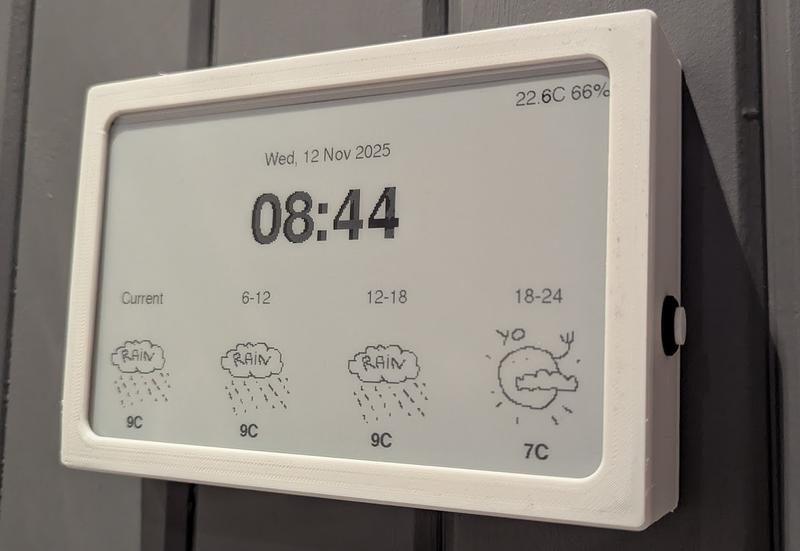
- I made this thing [1] for us, it uses a cheap 10" e-paper display off aliexpress, an ESP32 and a couple of I2C sensors. The case is 3D-printed. It runs on two 18650 batteries, and all in all it cost less than 100$. The OpenWeather API is free for personal use.
- hi I've been interested in doing something like this for myself, what tools and software did you use?
- +1, and have you tried running 2 displays side by side ? That should give you an effective diagonal of 14 inches or so, and for those displays, cutting it in two does not really affect the utility of the display (likely tabular content anyway).
Seems like the author has experimented with 2 kindles side by side.
- You can make smaller ones for much much less. I’ll post pics of mine a bit later but waveshare 7.5” display in a photo frame and almost any ESP32 dev board and you are set for less than $100 (along with suitable HomeAssistant and ESPhome infrastructure to support it). The original article is a very slick bit of work, so well done
- The article also mentions using jailbroken kindles which I assume should be the cheapest way to get a decent sized epaper screen with builtin connectivity.
edit: https://github.com/sibbl/hass-lovelace-kindle-screensaver
- Yep, it’s super cheap. I wrote about mine here:: https://franz.hamburg/writing/kindling-e-ink-dashboard.html
- You can also buy some for less than $100.
I can vouch for the reTerminal: the build quality is excellent, and they come with a battery, sd card reader, and some sensors: https://www.seeedstudio.com/reTerminal-E1001-p-6534.html
- Gonna piggyback here to second this and chime in to say I went with the BYOD screen linked within your link for $49 (SKU 104991005). It's definitely more barebones and probably not even as cost-effective if you're still planning on buying the "lifetime" TRMNL API access.
I don't have easy access to a 3d printer, so I just have mine sitting on an extra phone stand I had lying around that can be had for a few bucks from Amazon.
I couldn't be happier with it and am thoroughly enjoying my complacent, lazy solution :)
- There are a couple of options for a large, non-backlit, low power display that are less expensive than the e-ink monitor they're using. One is the Samsung EM32DX, a 32" color e-ink digital sign for <$1300 (<$1000 if you can find it on sale) but it has a long refresh time. The other is the SVD rE 32" reflective LCD monitor for ~$1000, but it needs to be in brightly lit rooms because of its low contrast.
- OP's Timeframe looks rad, but yes on the pricy side. check out trmnl .com for smaller / less expensive options and self hosted options. (disclaimer: i'm on the team)
- lol, €17.95 for a Developer "Unlock"[1].
- That's just a perpetual license to use their hosted server. You are free to use your own self hosted server for free.
- I’m a big fan of TRMNL! The big difference with the Boox device is real-time updates, which make the smart home status information much more useful.
- Yo Ryan! I get your emails! I was just reading this thinking “man he should’ve tried TRMNL”
I love my original one and am planning to get a model X when budget permits
- I have a similar setup at home with a homemade dashboard. It's less polished and I've never implemented smart home (don't use any smart home devices) but it's calendar, weather, air quality and subway alerts. I also took the tack of building the UI with Bootstrap 3 so that it will run on any of my ancient devices like a gen 2 ipad air. I did it as much to usefully recycle old screens as anything else.
- ~3000€ to show information in some random places in the house even though the household members have a device with a screen called a smartphone next to them 24/7 ?
Well, it's cool, but the usability of it all is below average.
Declutter your life and don't install any more screens in your home ;)
- It's a hobby but not for everyone. I mean if I could just throw away 3,000€ on random projects that might work or not I'd do it in a heartbeat. No different than buying a run down Porsche for 5,000€ and spending 40,000€ on restoration to original. Every hobby is like that but with different entry price points. There is a reason knitting is more popular than something like this (and even that has price tiers from 3€ for an acrylic yarn to upwards 100€ for luxury merino wool yarn)
- Alternative: just keep your phone on your charger in your room and declutter your life by using just the one screen in the kitchen.
- Keep it in airplane mode until you need it, the friction is enough to keep it out of hand, and it never asks for your attention by itself. Or at least disable every notifications
- Pick up phone (may be in another room), unlock phone, open app, navigate to information in app (often fairly annoying due to modern low information density app design and multiple apps), return to original location.
Versus.
Just look at screen.
- That's only when you are standing in front of the screen.
The equivalent of having the app open on your phone.
What if you are on a bus?
- This is just unnecessarily mean-spirited and unconstructive
- I think you could make it work for a fraction of the price if you buy a bunch of low-cost e-ink screens and combine them to create a larger display. The main challenge would be on the software side, as you'd need to control the content so it appears as a single, cohesive screen. However, I think this approach would be more appealing in terms of cost for most people.
- For those who lack the technical aptitude to use a smartphone (e.g. children, the elderly), a device that shows information in random places in the home is much more useful.
- Plenty of elderly people have the aptitude to use a smart phone. It's shockingly ageist to assume that old == inept.
- No, it's ableist to ignore the fact that many people _do_ have such issues, and many people don't but start having problems as they age.
- It’s also offensive to only think older people have these problems. Have any of you considered race or sex? Maybe certain sexes have this problem or maybe I enjoy getting offended by everything.
- "For those who lack the technical aptitude" > Well but many people do have the aptitude!
- This is exactly the type of nasty, mean-spirited, closed minded, completely lacking the hacker spirit comment I see so often on HN now.
- We waste billions of dollars so that AI creates recipes in the style of an Eminem rap and pelicans riding on a bike.
This is much more useful compared to that
- Information radiators are basically 80% of the reason I try to keep tabs on wireless power delivery. Then a Kia and Hyundai vendor thought they were going to get their wireless charging added to the EV6 and Ioniq vehicles and that’s the other 20%. Essentially they removed the transformer from the PSU and moved it to the air gap between the charging coil and the vehicle to halve the parasitic losses. You’d have a car you didn’t even need to plug in.
I’ve been following Information Radiators since practically the beginning, and wiring has always been one of its problems. First networking and now power. In homes, but also in office spaces. The best locations for radiators are often the worst for wiring.
And eInk displays move the needle because you have a device that can go completely to sleep between updates, which means it can trickle charge.
- I’m always surprised how much people seem to want to constantly know the weather.
- This may due to geographical differences, not sure where you live versus OP but I have lived in at least 7 different cities throughout my life and in some of those I had to deal with really unpredictable weather whereas in others it was easier to just wing it and not regret leaving with a jacket or umbrella for example.
- I'm in Scotland. Looking outside and seeing blue skies does not mean it's safe to leave without a rain jacket, or a thermal layer. Seeing fog in the morning doesn't mean you don't need shorts for the afternoon. It being 0 outside today doesn't mean it won't be 10 degrees tomorrow. Knowing it's going to rain between 10 and 2 is good motivation to take the dog out before 10. Knowing it's going to rain on Sunday but be clear on Saturday is a good reason to book outdoor activites (golf) on Saturday instead.
- I think with more outdoor activities, it's important to know what is waiting you in a few hour. For cycling example wind and rain information is rather good to know.
- Australia is the skin cancer capital of the world, with 2 in 3 of us diagnosed by age 70. The most used complication on my Apple Watch is the UV index, beating out weather temp, battery etc.
- Which is weird because it's pretty straightforward to work out if you need sunscreen or not:
Probably need some sun screen.* Is it any month other than May-August? * Is it after 10am or before 4pm?If you have very light skin you might want to increase the timeframe by an hour.
And if you really want to optimise your sunscreen usage and not use it if you don't have to, the real-time UV index from ARPANSA is the way to go (https://www.arpansa.gov.au/our-services/monitoring/ultraviol...).
All other apps simply display the expected UV index given the time of the day and the day of the year.
- Strong correlation with those who go outside.
- HN users baffled then
- It could be that they live in an area with more variable or more unpredictable weather than you. Or that they are much more outdoorsy. Or something else altogether. I'm surprised by your surprise. People live wildly different lifes and have correspondingly wide-ranging needs and preferences.
- If you have to walk the dog and know in advance it will stop or start raining in 20 minutes....
- Here in Reno, especially at this time of year, constant knowledge of the weather = constant knowledge of whether to expect road closures / traffic delays from snow, or whether I need to add extra time before going somewhere to defrost the windshield and remove snow, or whether I should grab a jacket.
- Agreed. Especially the current weather conditions. That's mostly useless info. Knowing the weather forecast for tomorrow or this weekend is actually useful.
It's strange that pretty much every weather widget assumes you want to know the current weather conditions and not the forecast.
- I live in Ireland, I need todays hour by hour forecast to know when I can get my kids outside.
- Eh, depends. If you have a dog, and live in a place with actual seasons, February requires frequently checking the current conditions before you head out—at least where we live, it could be anywhere from -10°C to +12°C right now, raining, snowing—annoying to put on a light jacket because you let the sun fool you, and discover it's freezing and starting to rain once you're on the field.
That said: I seem to get by pretty well with a lowly smartphone so far.
- Still, isn't the forecast for one hour from now more useful than literally now? You can see that through the window (and feel it on your face by opening the window).
- Not constantly but instantly. And because you don’t when they want it you have to show it always. Just like clocks always show the time.
- I had Windows^(TM) installed in my house when it was built. We're on the top of a 700' hill, so The Weather is pretty accurate.
- Ooh that reminds me of my weather rock.
- Same. You can always tell how is going to be the weather by yourself. Depending on how much time have you lived in the same place you can predict the weather for the day when you get up or, if you are a completely stranger to the environment, at least half an hour before.
- This is really cool. With a newborn in the home I've been really thinking about projects like this recently. When you have a newborn things are so busy and hectic that it's easy to get overloaded and for things to slip through the cracks so I've been really wishing I had a dashboard like this somewhere to remind me that we need to take the dogs out or show how long it's been since the baby last ate or whatnot.
- You have a newborn, and you think spending time installing and maintaining something that displays the calendar around the house is a good use of time?
- Wall-mounted dashboards are a huge life-hack, especially if you have a family. We got a 37-inch touchscreen one, running DAKBoard.
We have several kids and have been organizing our daily todos and calendars on it for several years. We used to drop the ball quite a bit due to a hectic schedule and the dashboard has helped us tremendously. Since it is mounted in the kitchen, being able to pull up recipes is a plus.
- > 37-inch touchscreen [..] in the kitchen
I think I need a bigger kitchen, haha.
That sounds really cool, though. I'm currently trying to "train" our kids to manage their own schedules, e.g. reminding me that they have somewhere to be instead of vice versa.
Maybe a wall-mounted solution would help put it front and center for them.
- We use a family paper calendar and I use my watch to check the weather and reminders. Still allows my phone to live in a box at home.
- This is awesome but I still find it funny that he said he wants a healthy relationship with technology then goes and fits his entire house out with technology. It doesnt seem like any of this would really be useful as you'd have to enter all the useful data manually(calendar).
For example the washing machine. You dont need real time information because you know how long it takes since you've done it 1000s of times and it beeps. All these things are just managed in our heads subconsciously.
- > For example the washing machine. You dont need real time information because you know how long it takes since you've done it 1000s of times and it beeps.
It beeps, on the other end of the house (or on another floor), where it's inaudible. (And, thankfully, where the loud sounds of it operating are also inaudible.)
> All these things are just managed in our heads subconsciously.
And when you remove the need to track that in your head, your head gets freed up for other things.
To be explicit, I don't like "smart appliances" that connect to a cloud server. I do like the idea of devices that can connect locally to something like Home Assistant.
- Even with no beeps you put washing on > you go get it when its done. It doesnt matter if it sits in the washing machine an extra 10m or an hour.
- "hey Siri, set timer for washing machine"
- but then apple knows about your cycles
- For you, maybe, but outsourcing ambient awareness of my environment is what’s finally enabled me to take that leap to a 10x dev. Well, that, and cranial cooling fins.
- It's about attention. You can check the schedule without thinking about messages, likes, or the news.
- Technology working for you is different than you working for technology.
- This is for sure an inspirational project, but I wish the barrier to entry was lower.
I've noticed e-ink/paper displays having somewhat of a moment right now (especially very small "phone-like" form factors as portable ereaders), and I hope this trend continues.
I'm very far from a meaningful reduction in "screen time," but looking at e-ink displays instead of OLEDs feels like a nice step in that direction.
- It'd be interesting to downsize this back to the LCD screen from a DC-1 [0]. These large format E-ink screens are cool, but outrageously expensive.
- It's possible an ordinary R-LCD would be good enough, perhaps with a DIY diffuser over the screen
- This is really cool, thanks for sharing the journey so far.
One potential idea - it might be worth looking at overseas manufacturers to see if they can offer a similar display at a better price point. I did a bit of digging on Alibaba, for example, and found a 25" E-ink display with the same resolution as the Boox for around $1000 (and the price goes down to $500 if you order 100 units or more): https://www.alibaba.com/product-detail/25-3-inch-e-paper-dis...
Seems like they offer a color E-ink display option as well, which could be worth exploring.
Note: I don't have any affiliation with the above company, it was literally just the first one I found when searching. I'm sure there are many other options available as well.
- Have you seen any that include a touchscreen? Would be nice for extremely simple home controls (e.g. thermostat, music).
- That is one interesting experiment, also hoping for cheaper and larger panels.
Here is my ~75euros ESP32 eink panel experiment: https://github.com/riston/eink-assist-screen/tree/main
- Why is e-ink still so expensive?
- It's cheap if you are buying the small displays they use at supermarkets. No business is buying these massive displays.
- I would guess there's not enough volume due to limited use-cases of the tech compared to more traditional screens.
The typical e-ink uses cases boil down to e-readers, dumb-phones, and hobbyists, which is not a huge market. Anything niche or specialized tends to carry a higher cost.
- The prices on Ali Express for e-ink are not that bad, but certainly can't get anything as big as the Mira Pro. The Boox premium is plug and play compatibility, high fidelity/refresh rate and support.
- A video demo of this e-ink frame is shown in this video: https://youtu.be/Wkzg8sNkm8Y
- The developer recently had a home tour where you can see this software in use
- Why e-paper over a monitor with a presence sensor? Wouldn't it be cheaper and higher fidelity?
- The cost differential between ePaper displays and the comparatively cheap jumbo tablets will offset higher current consumption for a good long while: https://www.aliexpress.us/item/3256808694032679.html
- I don't see that TFA claimed any cost savings. That is not the reason people go for e-paper.
- $338 shipping!
- My solution is based on 12.48 inch Magic Ink Calendar:
https://github.com/speedyg0nz/MagInkCal
A 12.48 Waveshare eink display costs $175. Sadly haven't gotten it to work with the Raspi Zero and therefore can't use it battery-powered. Got an ugly cord right now. Running power to the right place through the walls is definitely dedication!
- You can run rust on kindles, so you don't need a separate webserver. You can fetch stuff and render the image directly on the kindle. Second hand kindles can be very cheap.
https://github.com/benjajaja/kindle-bueno
However, I would now go for some ~100€ e-ink that is built for hacking.
- We do this with a raspberry pi and a decent lcd screen in a picture frame in our kitchen. I like the idea of e-ink but there isn’t a reason to go that route if you want to see everyone’s calendar color-coded while also saving a few bucks.
Love the artistry and dedication in this effort - getting something just right for your own tastes and honing it over time can be really fulfilling.
- You can get multicolour e-ink displays.
Still expensive though
- A project, ZerryBit, are working to do something similar - albeit on a far smaller scale physically than what you’ve done here. Might be of interest to OP or others though - further info at https://zerrybit.com/en-us (I have no link to them bar placing an advance order)
- I love the idea of putting this under portrait lighting rather than using a backlight.
- Aesthetically, that e-ink screen looks gorgeous. But the idea of having to maintain a bunch of services and hardware so that I can see my calendar, I hate it.
- I LOVE this, but I am still love the Sunday night family bonding moment of planning the week in the pen and paper weekly planner that also costs us $10 a year.
- The Inkplate10 is an excellent, much lower cost way to get into this
- This is really awesome! Dream home project for me as well, but can't justify the cost of large e-ink displays so far (was shocked at the nearly ~$2k sticker price of that Boox Mira Pro!)
- I'm actively looking for someone who wants to create B2C devices like this for an app that I built. Email in my profile!
- Maybe the folks at TRMNL? https://trmnl.com/
- Nice!
Though, $2000 is a step price.
I had some fun with using an Inkplate e-ink display - bough a bare 5" for €74 (a 10" with batteries is there €219). Smaller, but also way more affordable.
It connects via WiFi, and make it display random, vide https://github.com/SolderedElectronics/Inkplate-Arduino-libr....
- Interesting but it assumes the teens will bother to look at it.
We use a WhatsApp channel for our family to manage breakfast meetups and who needs what from the shops or the pharmacy (they are on our healthcare plan) and general conversation about events or troubles and parental advice in their lives.
One kid live on her own with her bf a few minutes from us but she can't drive so we sometimes have to pick her up from work.
It gets muddled but works for us as the rule is no pet photos unless it is very cute (cat with a dustbin cover on his head) or inspirational daily quotes.
- Which OLED screen is shown in the "A more reliable approach" paragraph?
- It’s the Dell Venue: https://youtu.be/eTFkE9yjfoc
- Very nice, looks great
- This is cool. I bought an Inkplate for this and got as far as writing a custom image format suitable for e-ink sort of things (4-bit RLE; trivial to decode, but good compression for diagram/text type images).
Where I got stuck is calendars... Unfortunately Google Calendar doesn't seem to provide a nice API where you can just say "give me the events for these days", instead you can only download all of your events in iCal format. It's then extremely non-trivial to convert that information into "what is happening today".
- There are several ways to get all events for the day! The easiest one in my experience has been to write a simple Apps Script project and expose that as a published Web App[1]. That moves all of the oAuth logic and Calendar API plumbing to Google's server-side code, and gives you a simple long URL that contains exactly what data you want.
Something like:
```
function doGet(req) {
}let start = new Date(); start.setHours(12,0,0,0); let end = new Date(start); end.setDate(end.getDate() + 3); let events = CalendarApp.getEvents(start, end); return ContentService.createTextOutput(events.map(x => x.getTitle()));```
- Ooo sweet, thanks for the hint!
- I'd buy this. Good luck with the project.

386 points by saeedesmaili 3 hours ago | 107 comments